Social media privacy: How to protect your data online


Social media privacy goes beyond who can see a post. Platforms can also track how long someone pauses on a video, which links they tap, and interactions that occur through ads or tracking technologies connected to the platform.
Some of this data remains on the platform to inform recommendations and ad targeting. Some may be shared with advertising or analytics partners. In some cases, it can also be exposed through scraping or data breaches.
This article explains what social media privacy means, how data collection works, the risks involved, and practical ways to limit exposure.
What is social media privacy?
Social media privacy refers to how personal information connected to a social media account is collected, shared, and controlled. It applies both to the information someone chooses to post and the data platforms generate from how an account is used, such as interests inferred from activity, time spent viewing posts, and patterns of interaction.
Platforms also record activity like searches, likes, time spent viewing posts, and interactions with ads. Together, this activity becomes part of a profile linked to the account and may be used for advertising, recommendations, and security monitoring.
How social platforms collect and share data
Social media platforms collect data from both what people share and how they use the service.
Data mining and profiling
Platforms analyze activity across the service to build advertising profiles tied to each account. These profiles use behavioral signals to infer interests, purchasing intent, and demographic traits. They influence which posts appear in a feed and which ads are displayed.
Platforms may also infer attributes users never provide directly. Based on activity patterns, a platform might estimate categories such as household income and spending power. Some platforms show parts of these categories in advertising settings, but they usually don't reveal the full profile or how those inferences are generated.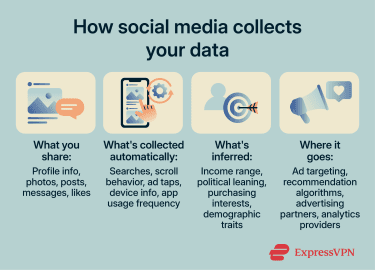
Tracking across apps and websites
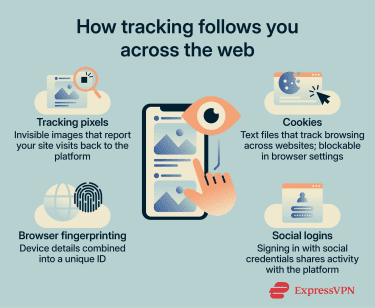
Data collection often continues outside the social media app itself. Platforms and advertising partners use several technologies to observe activity across other websites and services.
- Tracking pixels: These are tiny images embedded in webpages or emails. When a page loads, the pixel sends a request to the platform's server, which can identify that a specific user visited that page. This is how someone can see an ad for a product shortly after viewing it on another site.
- Cookies: Cookies are small text files that websites store on a user’s device. Third-party cookies are placed by advertising networks or other embedded services rather than the site being visited, and they have long been used to track browsing activity across multiple websites.
- Browser fingerprinting: Fingerprinting identifies a device by combining configuration details such as screen resolution, installed fonts, time zone, and graphics capabilities. Together, these attributes can create a distinctive identifier that persists across sessions. Unlike cookies, fingerprints aren’t stored locally and can be harder to reset, making them a fallback when cookies are blocked or cleared.
- Social login integrations: Many websites allow users to sign in with their existing social media accounts. When this happens, the platform receives information about that interaction. What gets shared depends on the permissions granted during sign-in. The third-party service may also gain access to parts of the user's profile.
Third-party sharing and advertising
Data collected by social platforms may be shared with advertising partners, analytics providers, and other service partners, depending on the platform's policies and user settings. In some cases, these partners act as controllers, meaning they receive data and use it for their own purposes. In others, they act as processors, handling data on the platform’s behalf under its instructions. Most major platforms authorize some form of data sharing in their terms of service.
Advertisers typically target audiences based on demographics, interests, and behavioral patterns. These categories can draw on platform activity and data collected from other apps and websites. As a result, activity on social media can influence ads shown across the broader web.
Some platforms may also use collected data to train recommendation systems, ranking algorithms, and generative AI models. Whether users can limit this use varies by platform.
Understanding privacy risks on social media
Privacy problems on social media usually don't come from a single post. They happen when different pieces of information add up or reach people who weren’t meant to see them.
Oversharing and your digital footprint
Individual posts, comments, and likes may not seem revealing on their own. But publicly available posts can be systematically combined by platforms, data brokers, or other parties to infer information someone didn't intend to share.
Workplace mentions, tagged locations, school references, and photos with identifiable landmarks can narrow down where someone lives or works. Patterns of interaction can also reveal relationships and group affiliations.
Even content shared with a restricted audience can be screenshotted, reshared, or exposed in a breach.
Read more: Different ways you can be identified through social media
Default settings and unclear permissions
Many platforms start with broader visibility settings unless users change them. A new account may have a public or semi-public profile, allow search engine indexing, enable contact syncing, and permit various forms of data sharing with advertising partners.
Changing these settings often means digging through menus that may be buried or inconsistently labeled. Some permissions are bundled together. This often happens when apps request broad access instead of feature-specific permissions.
Allowing an app to access your location for one feature can also allow it to use that location data for advertising. Platform updates can also add new settings or change existing permissions, so options you previously adjusted may revert to their defaults.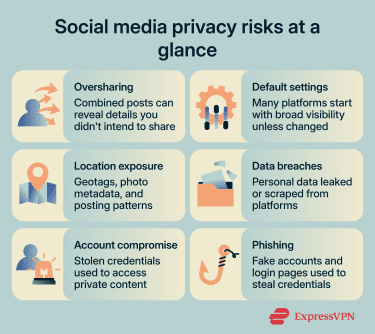
Location privacy
Location data can reveal where someone lives, works, and travels. Platforms collect it through features users enable and through less visible technical details.
- Explicit sharing: Geotagged posts, check-ins, and similar features can broadcast a user's location to followers and, depending on settings, to advertising partners.
- Indirect exposure: Smartphone photos often contain hidden metadata (EXIF), such as GPS location, timestamps, and device details. Many social media platforms strip this from public images, but it may still be retained internally or persist when shared via email, messaging apps, or cloud links. Posting patterns (for example, consistent times or locations) can also reveal where someone lives or works.
Related: How to make your photos more private on social media
Data breaches
Social media platforms store large amounts of personal information, including names, email addresses, phone numbers, profile details, private messages, location signals, and advertising identifiers. If this data is exposed in a breach, it can be used for spam, phishing, identity theft, account takeover attempts, or targeted harassment.
Breached data can also keep creating risks long after the original incident. Email addresses and phone numbers may be added to scam lists, passwords may be tested on other accounts, and old personal details can be used to make phishing messages more convincing.
Phishing and social engineering
Social media platforms are common channels for social engineering attacks. Phishing on social media often appears as direct messages containing malicious links, fake login pages that imitate the platform's sign-in screen, or posts impersonating legitimate brands.
Angler phishing is one example. Attackers create fake customer support accounts and respond to users who publicly complain about a service. The attacker then redirects the user to a fake login page designed to steal their credentials.
Fake verification messages are another common social media phishing tactic. They may arrive as DMs, emails, or in-app-style notices using the platform’s name, logo, colors, or other familiar branding. These messages often claim that your account needs to be “verified,” “secured,” or “reviewed” to avoid suspension, then link to a fake social media login page designed to steal your username, password, or two-factor authentication (2FA) code.
How to protect your privacy on social media
Protecting your privacy on social media mostly comes down to two things: adjusting platform settings and securing your accounts.
Adjusting your privacy settings
The exact steps vary by platform, but these adjustments apply broadly.
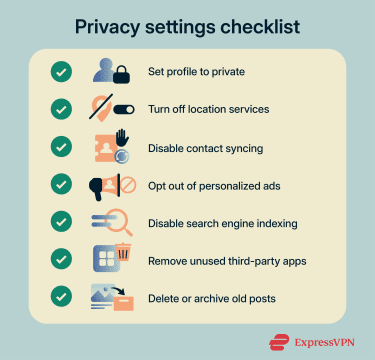
- Profile visibility and audience controls: Set your profile to private or restrict who can see your posts. On Instagram, a private account limits content to approved followers. On Facebook, users can set a default audience for future posts and restrict past posts to friends only. Private accounts on most platforms aren't indexed by search engines, since there's no public content to surface.
- Limiting data sharing and ad preferences: Most platforms have an ad settings section where users can opt out of personalized advertising, which reduces how their activity is used for ad targeting. For example, Facebook's off-platform activity tool shows data collected from other websites and apps and lets users disconnect it. Disabling this limits the amount of off-platform activity used for ad targeting. Data may still be collected, but not used to personalize ads.
- Turning off location and contact syncing: Disable location services for social media apps in your phone's OS settings, not just inside the app. Turn off contact syncing too. This prevents the platform from uploading your address book to suggest connections or build ad profiles.
- Revoking third-party app access: Review which apps have permission to access your social media accounts. Remove any you no longer use. Connected apps may retain access to profile data, friend lists, or posting permissions long after you stop using them.
- Removing old posts and data: Some platforms let users bulk-delete or archive old posts. Reducing historical data on an account limits what's exposed if the account is compromised or if the platform's data practices change.
Keeping your accounts secure
Privacy settings limit what's visible, but account security determines who can get in. These steps protect against unauthorized access.
- Strong passwords and password managers: Use a unique password for every social media account. Avoid passwords based on birthdays, pet names, or other details guessable from your own posts. A password manager like ExpressKeys generates and stores complex passwords so you don't have to memorize them.
- Multi-factor authentication (MFA): Enable MFA on every account that supports it. It adds a second verification step, usually a code from an authenticator app or SMS.
- Browsing on public Wi-Fi: Public Wi-Fi networks are shared environments, and not all of them are configured securely. Using a virtual private network (VPN) on public networks adds a layer of encryption between the device and the VPN server, helping protect traffic from exposure on the local network.
What to do after a privacy breach
The right response depends on whether someone accessed your account directly or whether your personal information was exposed through a breach affecting another service.
Account compromise
If you suspect unauthorized access:
- Change your password: Do this immediately. If you're locked out, use the platform's account recovery process.
- Review connected apps: Remove any third-party apps or services you don't recognize.
- Enable MFA: If it isn't already active, turn it on.
- Check login sessions: Look in the account's security settings for unfamiliar sessions and revoke them.
- Notify contacts: If the attacker sent messages from your account, let your contacts know.
Data exposure
If your information appears in a breach:
- Change reused passwords: Update credentials on any account that shared a password with the exposed service.
- Monitor financial accounts: Check bank accounts and credit reports for unauthorized activity.
- Consider a credit freeze: If sensitive personal or financial details were exposed, a freeze or fraud alert with major credit bureaus can prevent new accounts from being opened in your name.
- Watch for phishing: Attackers may use breached data to craft targeted messages. Be cautious with unexpected emails or DMs in the weeks following a breach.
Reporting and documentation
Report the incident to the platform through its in-app tools. If financial data or identity theft is involved, file a report with the relevant authority (the Federal Trade Commission (FTC) in the U.S. or Report Fraud in England, Wales, and Northern Ireland). Keep records of unauthorized activity, platform communications, and steps you've taken. This documentation may be needed for disputes or legal claims.
Social media privacy for teens and families
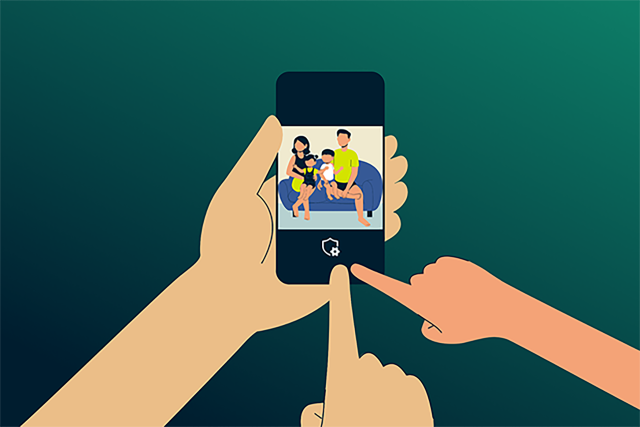
Teens often use social media to stay connected with friends, classmates, and communities, but they may not always realize how far a post can travel or how long it can remain searchable.
Parents and guardians can help by setting clear expectations around what should not be shared publicly, such as school names, home addresses, phone numbers, live locations, travel plans, and photos that reveal daily routines. Teens should also know how to block, mute, report, and document unwanted contact, impersonation, harassment, or pressure to share personal information.
When it comes to privacy settings, private accounts are usually a safer default for younger users, but it’s important teens understand that these don’t make content fully private. Friends can still save or share posts, group chats can include people the teen doesn’t know well, and platform settings can change over time.
Read more: Internet safety for kids: 10 rules every parent must know
Legal rights and platform responsibilities
Several laws give users rights over how their personal data is collected and used on social media. The specifics depend on jurisdiction.
Under the General Data Protection Regulation (GDPR), users in the EU have rights that include accessing their personal data, requesting deletion in certain circumstances, and withdrawing consent where consent is the legal basis for processing.
The California Consumer Privacy Act (CCPA) grants California residents the right to access their collected data, delete their data, and opt out of data sales or sharing. A growing number of U.S. states have enacted their own comprehensive privacy laws, though the U.S. doesn't have a single federal privacy law comparable to the GDPR.
Understanding terms of service
Before creating an account, users agree to a platform's terms of service and privacy policy. These documents cover what data is collected, how it's used, and what happens to it after an account is deleted.
These policies typically address whether the platform claims a license to content users upload, how long data is retained after account deletion, and what the platform must disclose in the event of a breach.
When legal action may apply
If someone believes a platform has mishandled their data, they can file a complaint with data protection authorities such as the FTC in the U.S. for unfair or deceptive practices or the Information Commissioner’s Office (ICO) in the U.K. for data protection concerns. In some jurisdictions, class-action lawsuits may also be possible.
FAQ: Common questions about social media privacy
What are the biggest privacy risks on social media?
What privacy settings should I change on social media?
How can I reduce tracking and targeted ads?
How can I secure my social media accounts?
Can you legally stop someone from posting about you on social media?