ExpressVPN
    • Política sin registros
    • Servers in 113 Countries
    • Use on Multiple Devices
    • High-Speed VPN
    • Access Online Services Securely
    • VPN para gaming
    • Descubra todas las funcionalidades
    • Acerca de ExpressVPN
    Sign Up For Expressvpn

    One subscription gives you access to a fast-growing suite of privacy and security tools that work seamlessly together to improve your digital life.

    View all products
    • Protocolo de VPN Lightway
    • Internet Kill Switch
    • Tunelización Dividida
    • Private, Encrypted DNS
    • Avoid ISP Throttling
    • Threat Manager
    • Bloqueador de anuncios
    • Controles parentales
    • IP dedicada
  • Descargar VPN
    • Windows new
    • MacOS new
    • Linux new
    • iPhone / iPad
    • Android
    • Apple TV
    • Fire Stick
    • Android TV
    • VPN para Routers
    • Router Aircove
    • Chrome
    • Firefox
    • Edge
  • Pricing
    • ¿Qué es una VPN?
    • VPN for Beginners
    • How To Use a VPN
    • VPN Encryption Explained
    • Blog
    • Glossary
    • IP Address Checker
    • Prueba de fugas de DNS
    • Prueba de fugas de WebRTC
    • Generador de contraseñas
    • Centro de Soporte
    • Preguntas frecuentes
    • Chat en vivo
    • Tutoriales de configuración de VPN
    • Redemption Code
  • Icon10VPN for Teams
  • Productos
    Icon11

    ExpressVPN for Teams Get fast, secure VPN protection for growing teams. Easy to deploy, simple to manage, built to scale.

    Img2
    • ExpressVPN

      ExpressVPN Industry-leading, ultra-fast VPN with secure servers in 113 countries.

    • ExpressMailGuard

      ExpressMailGuard Private email relay service to protect your inbox and identity.

    • ExpressKeys

      ExpressKeys Secure password management, multi-factor authentication, and more.

    • ExpressAI

      ExpressAI The first consumer AI powered by confidential computing for privacy-led intelligence.

    • Identity Defender

      Identity Defender Powerful suite of ID protection, monitoring, and data removal tools

    Other products from the family behind ExpressVPN

    • holiday.com eSIM

      holiday.com eSIM Unlimited data with a single eSIM across 150+ destinations.

    • Intego

      Intego Award-winning macOS antivirus, firewall, system tools, and more.

  • Mi cuenta
Comenzar
ExpressVPN
    • Política sin registros
    • Servers in 113 Countries
    • Use on Multiple Devices
    • High-Speed VPN
    • Access Online Services Securely
    • VPN para gaming
    • Descubra todas las funcionalidades
    • Acerca de ExpressVPN
    Sign Up For Expressvpn

    One subscription gives you access to a fast-growing suite of privacy and security tools that work seamlessly together to improve your digital life.

    View all products
    • Protocolo de VPN Lightway
    • Internet Kill Switch
    • Tunelización Dividida
    • Private, Encrypted DNS
    • Avoid ISP Throttling
    • Threat Manager
    • Bloqueador de anuncios
    • Controles parentales
    • IP dedicada
  • Descargar VPN
    • Windows new
    • MacOS new
    • Linux new
    • iPhone / iPad
    • Android
    • Apple TV
    • Fire Stick
    • Android TV
    • VPN para Routers
    • Router Aircove
    • Chrome
    • Firefox
    • Edge
  • Pricing
    • ¿Qué es una VPN?
    • VPN for Beginners
    • How To Use a VPN
    • VPN Encryption Explained
    • Blog
    • Glossary
    • IP Address Checker
    • Prueba de fugas de DNS
    • Prueba de fugas de WebRTC
    • Generador de contraseñas
    • Centro de Soporte
    • Preguntas frecuentes
    • Chat en vivo
    • Tutoriales de configuración de VPN
    • Redemption Code
  • VPN for Teams
  • Productos
    • ExpressVPN

      ExpressVPN Industry-leading, ultra-fast VPN with secure servers in 113 countries.

    • ExpressMailGuard

      ExpressMailGuard Private email relay service to protect your inbox and identity.

    • ExpressKeys

      ExpressKeys Secure password management, multi-factor authentication, and more.

    • ExpressAI

      ExpressAI The first consumer AI powered by confidential computing for privacy-led intelligence.

    • Identity Defender

      Identity Defender Powerful suite of ID protection, monitoring, and data removal tools

    Other products from the family behind ExpressVPN

    • holiday.com eSIM

      holiday.com eSIM Unlimited data with a single eSIM across 150+ destinations.

    • Intego

      Intego Award-winning macOS antivirus, firewall, system tools, and more.

    Icon11

    ExpressVPN for Teams Get fast, secure VPN protection for growing teams. Easy to deploy, simple to manage, built to scale.

    Img2
  • Mi cuenta
Comenzar
Home Home » Cómo encontrar las credenciales para la configuración manual

Gestionar su cuenta

Cómo encontrar las credenciales para la configuración manual

Última actualización: 10 de septiembre de 2026

Share in FacebookShare in TwitterShare in WhatsappShare in TelegramShare by email
Get started with ExpressVPN.
¿Qué puede hacer una VPN?
Muéstrenme

Learn about five ways to use ExpressVPN.
5 maneras de usar su VPN
Verlas ahora

Los dispositivos incompatibles con la aplicación de ExpressVPN se pueden configurar manualmente para usar la VPN. En esta guía, veremos cómo encontrar las credenciales y las direcciones del servidor necesarias para la configuración manual.

Si quieres encontrar las credenciales necesarias para la configuración manual, haz lo siguiente:

  1. Ve a la página de configuración manual de ExpressVPN.
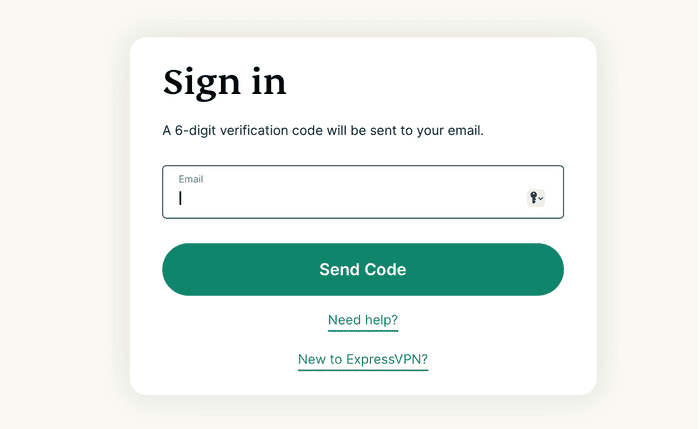
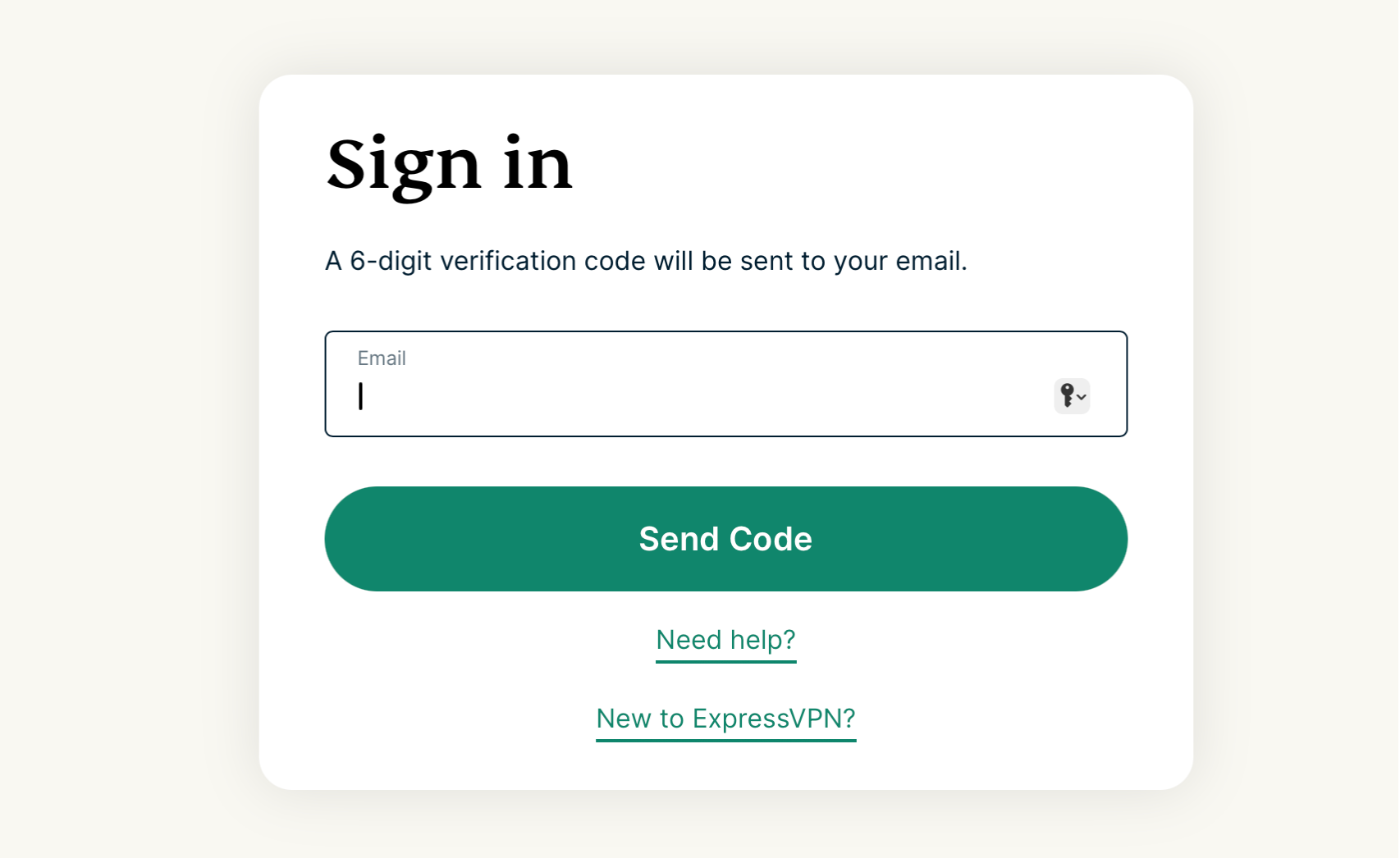
    1. Si es necesario, escribe tu correo y pulsa Send Code (Enviar código)ExpressVPN's Sign in page on desktop.
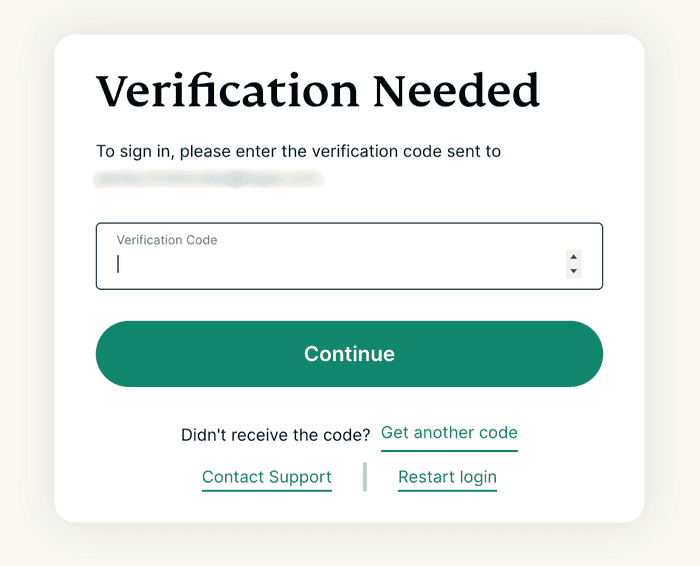
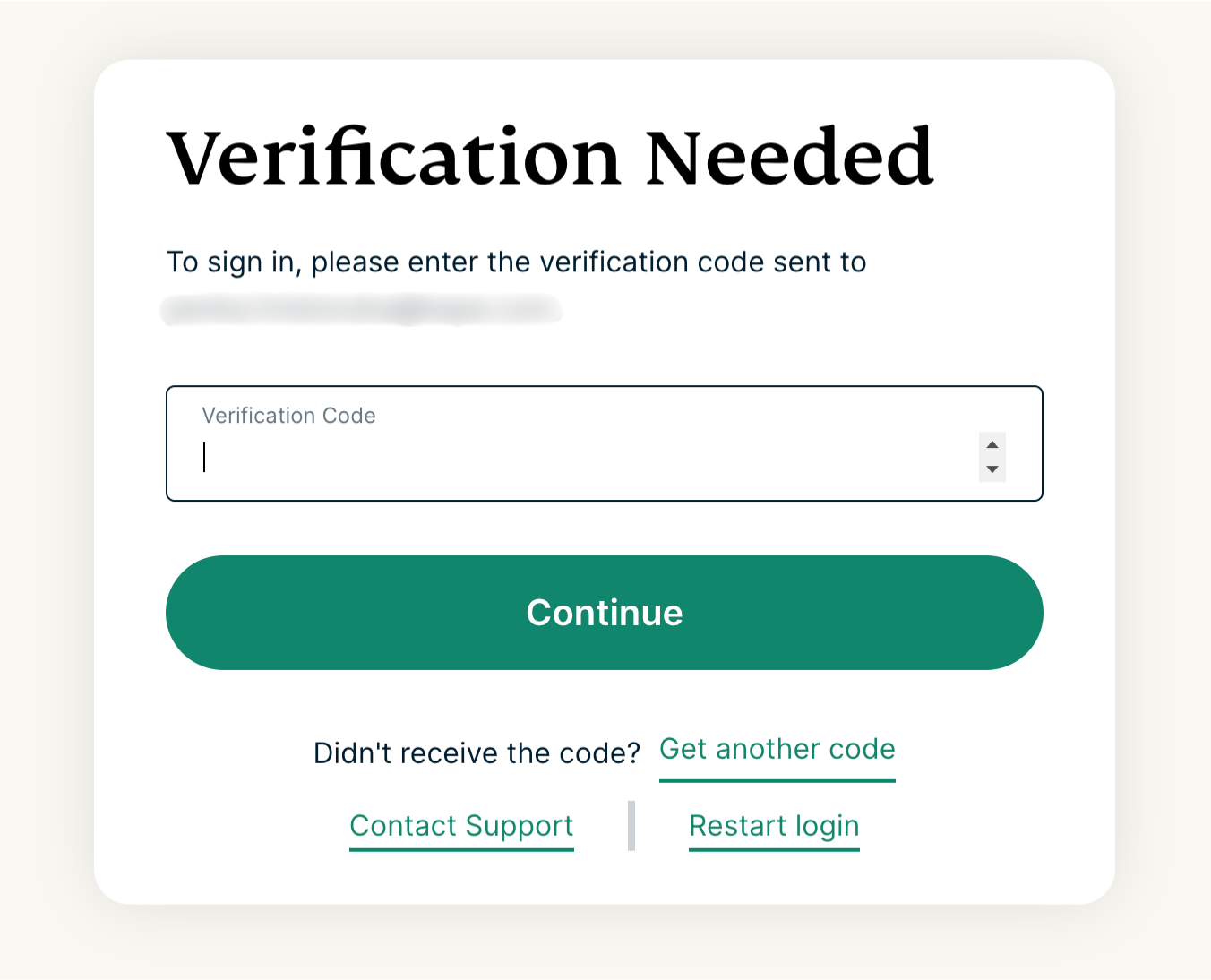
    2. Escribe el código de verificación que hayas recibido en el correo y luego selecciona Continue (Continuar)ExpressVPN's Verification Needed page on desktop.
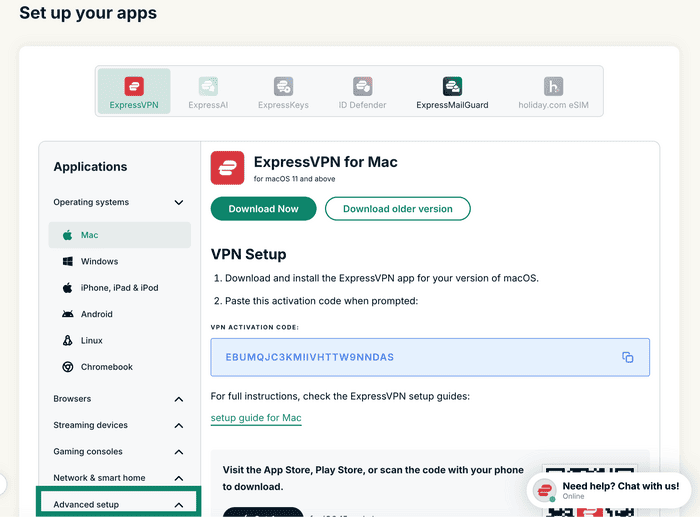
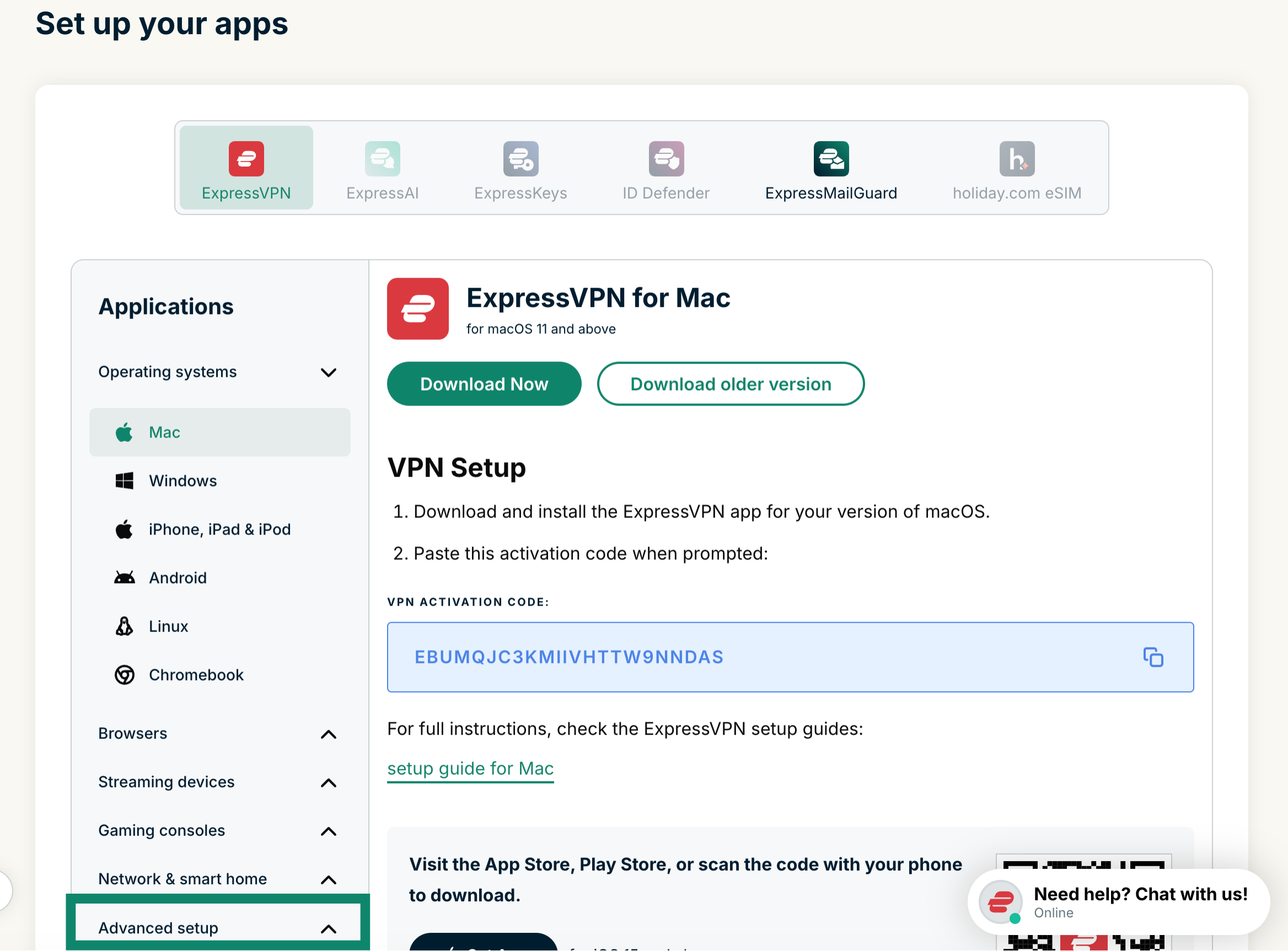
  2. Haz clic en Advanced setup (Configuración avanzada) en Applications (Aplicaciones).The "Set up your apps" page in ExpressVPN+, with a highlighted "Advanced setup" option at the bottom.
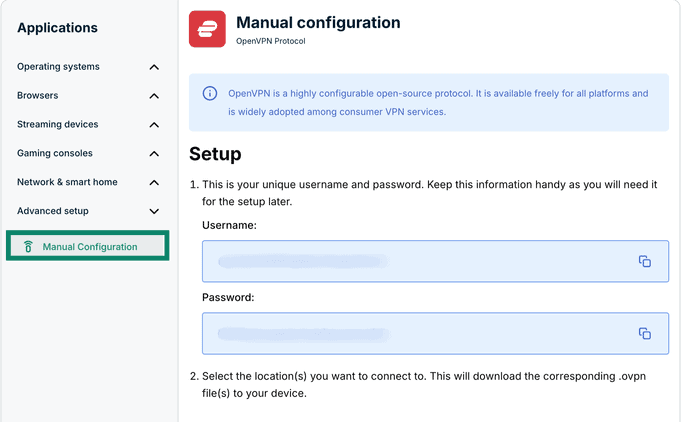
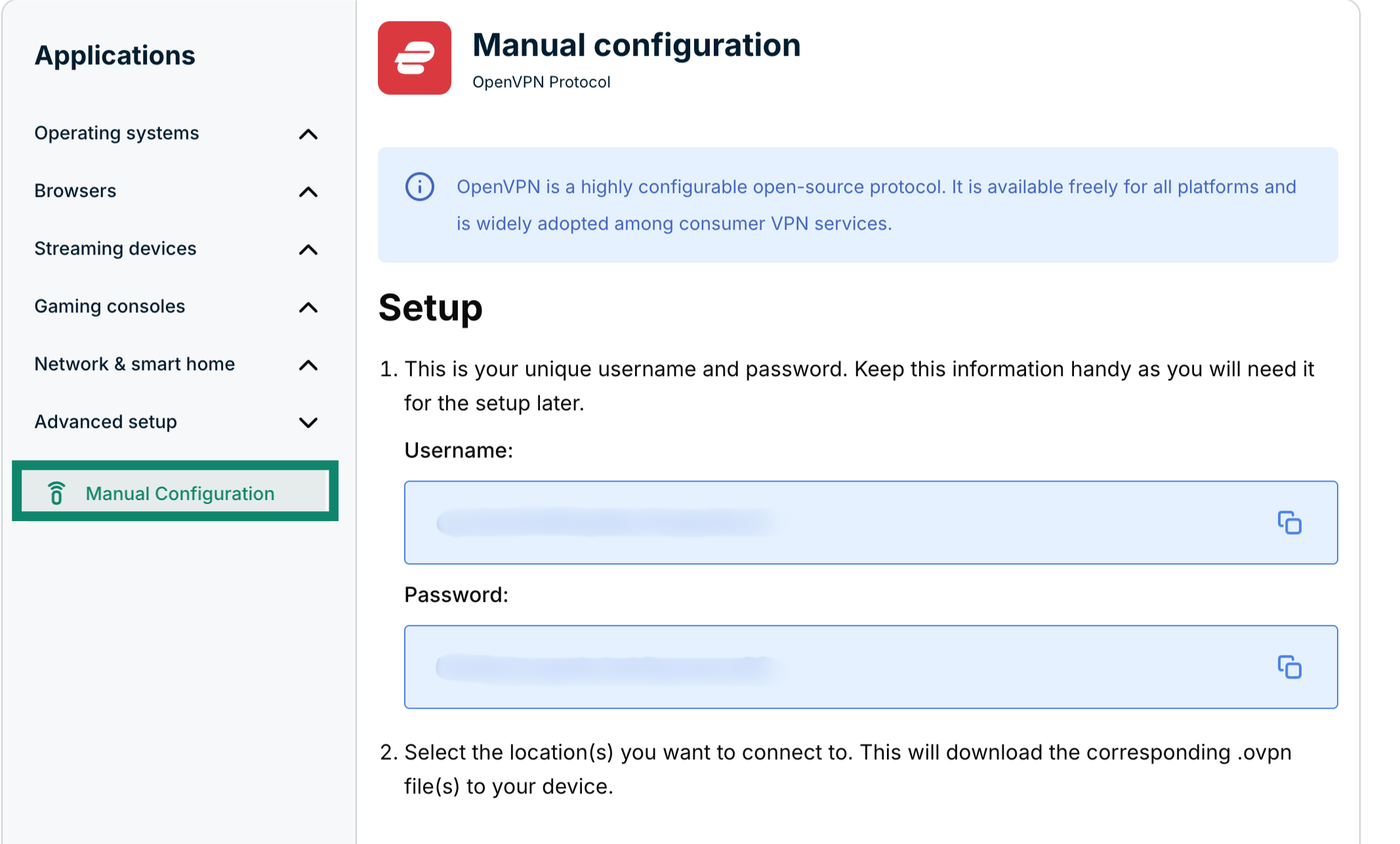
  3. Clica en Manual configuration (Configuración manual)The "Manual Configuration" option in ExpressVPN+ highlighted.
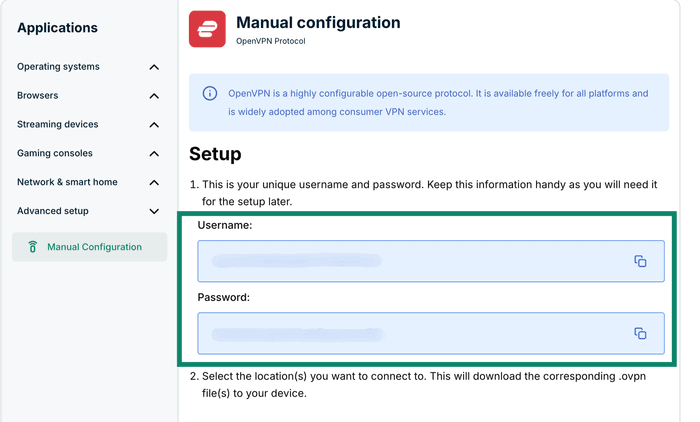
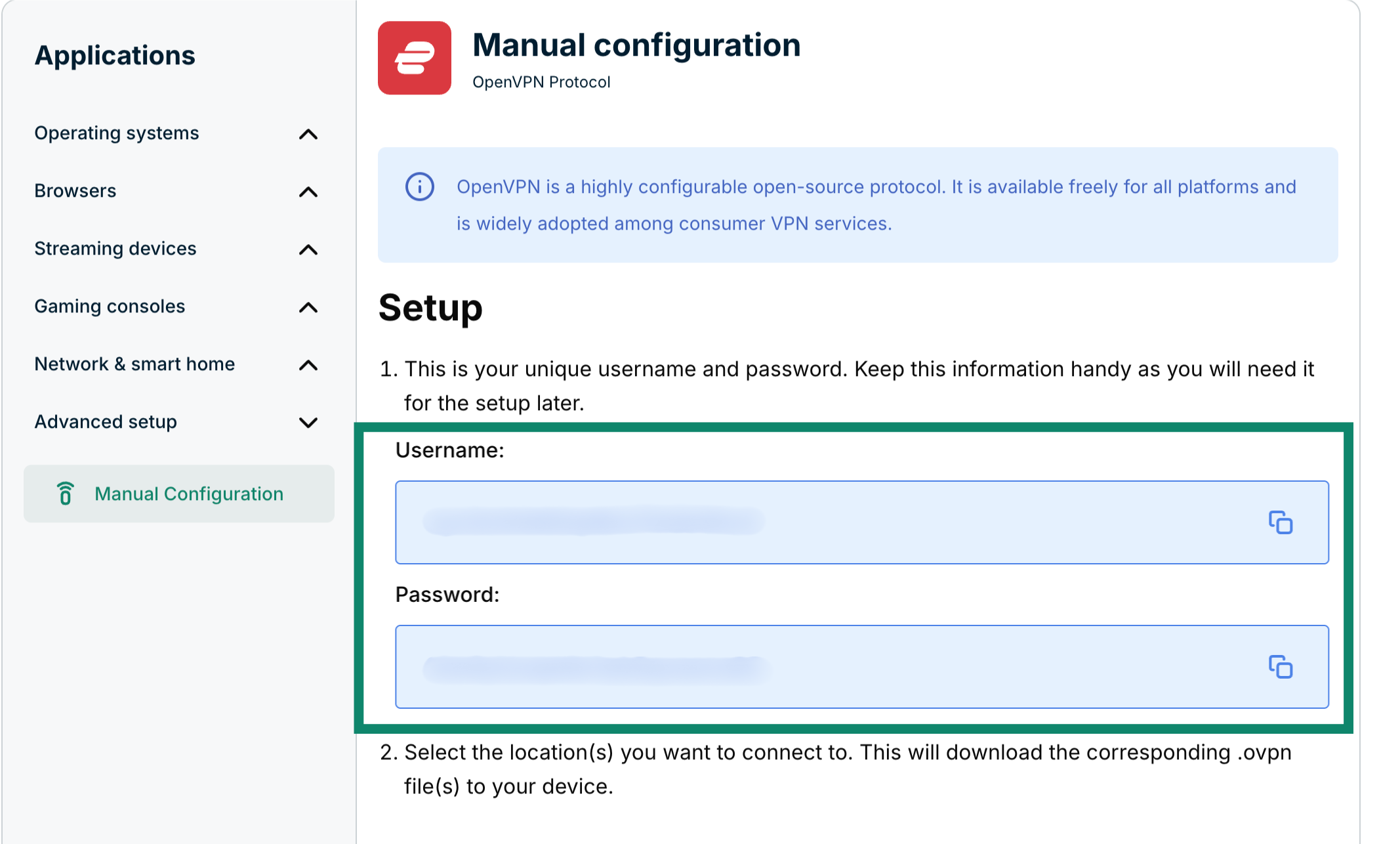
  4. Encontrarás tu nombre de usuario y contraseña en la parte derecha, debajo de Setup (Configuración) en el paso 1.The Manual configuration page in ExpressVPN+, highlighting the username and password for the user.
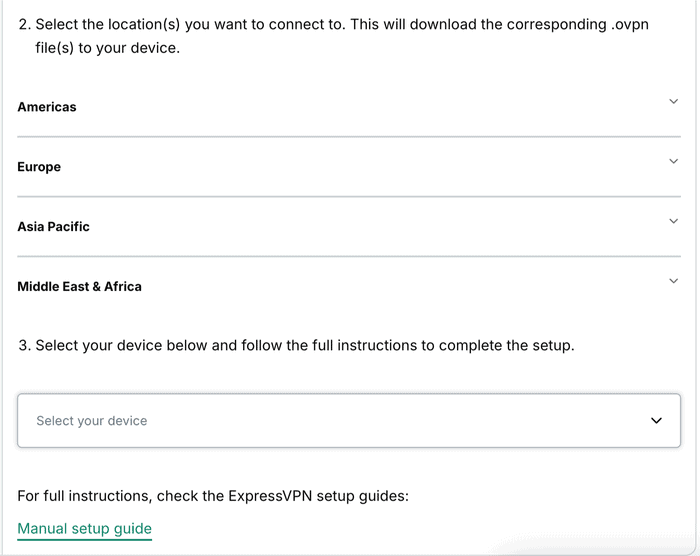
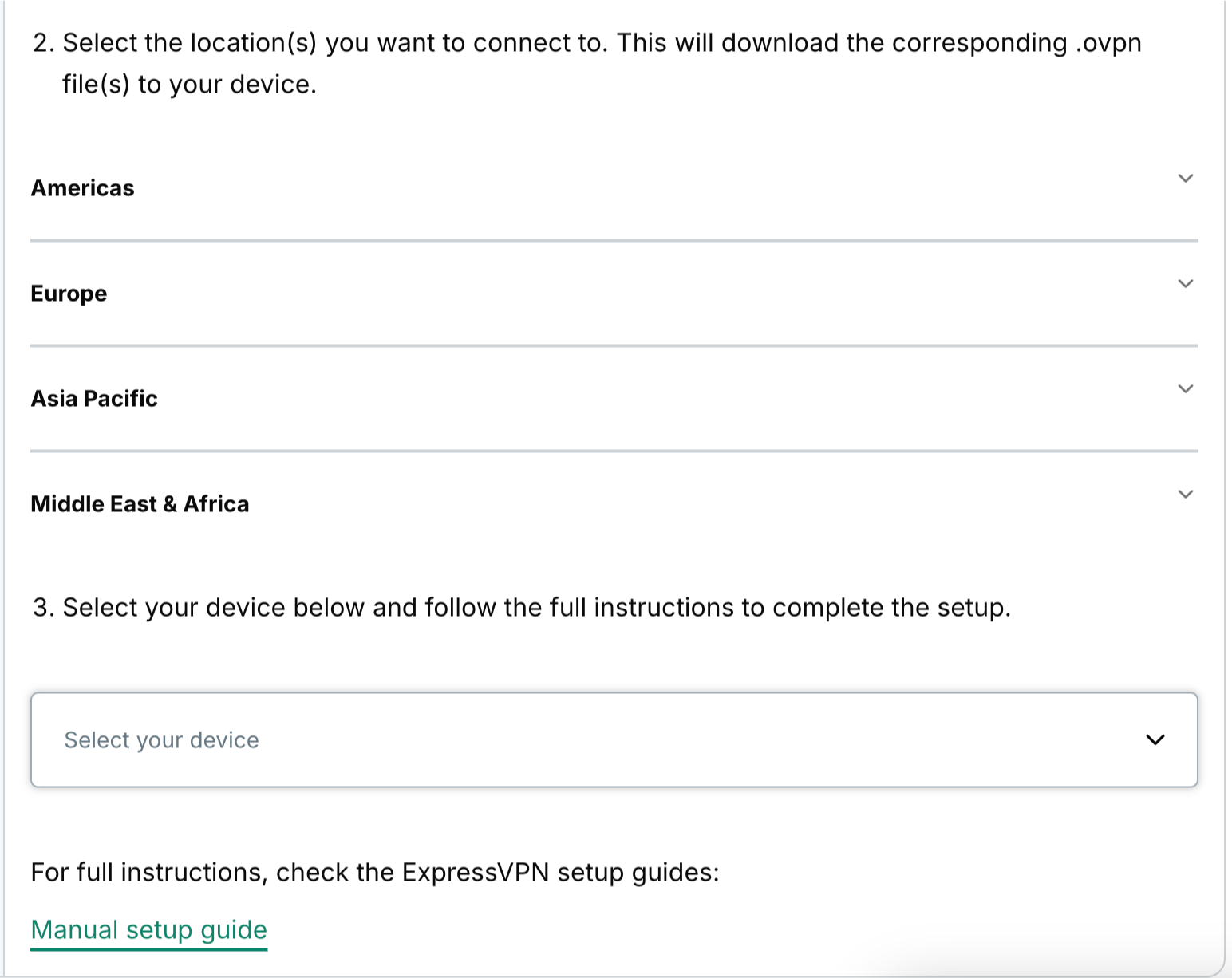
  5. Baja hasta el paso 2 para ver las regiones disponibles. Haz clic en una de las regiones para abrir el menú desplegable y ver las ubicaciones disponibles.The available regions for manual configurations in ExpressVPN+.
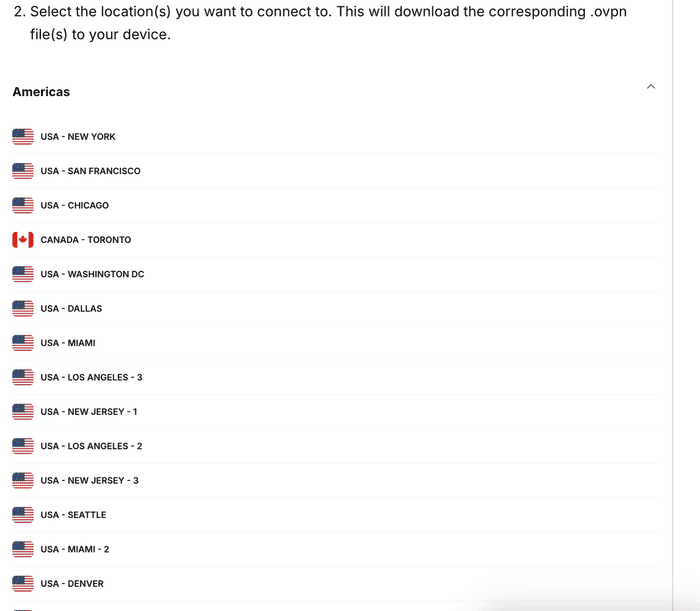
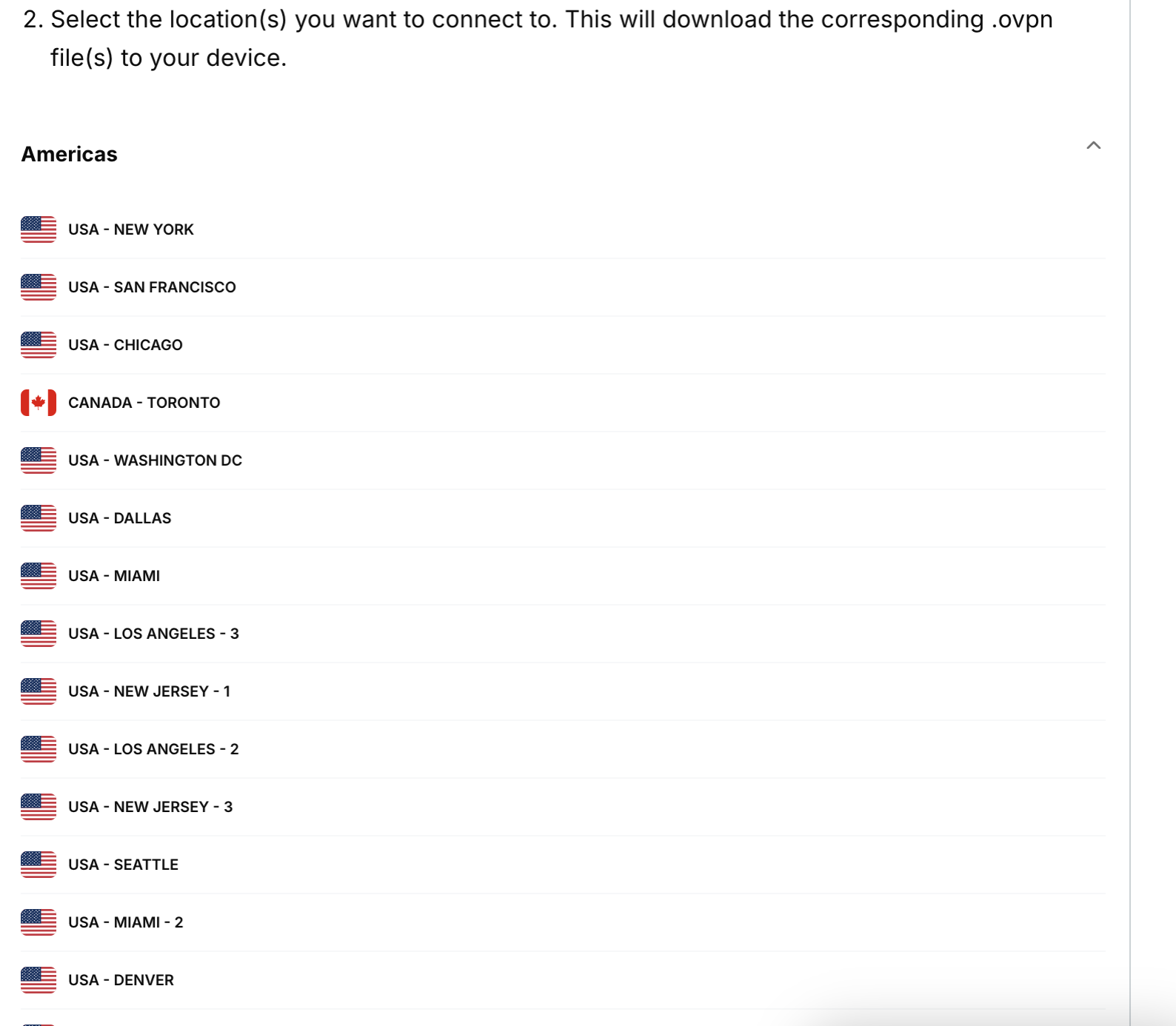
  6. Clica en una ubicación para descargar el archivo automáticamente.The Americas section in the available regions in the ExpressVPN+ portal, showing a list of available locations from that region.

Mantén esa ventana del navegador abierta durante la configuración manual para usarla como referencia.

¿Necesitas ayuda? Ponte en contacto con el equipo de soporte de ExpressVPN para recibir asistencia inmediata.

Volver arriba

Share in FacebookShare in TwitterShare in WhatsappShare in TelegramShare by email
¿Le ha sido útil este artículo?

Lamentamos escuchar eso. Háganos saber cómo podemos mejorar.

Please enter a valid email address.

Un miembro de nuestro equipo de soporte técnico le dará seguimiento a su problema.

Share in FacebookShare in TwitterShare in WhatsappShare in TelegramShare by email

Artículos relacionados

  • Windows 10 PPTP (manual setup)
  • Windows (OpenVPN manual setup)
  • Mac OS X (OpenVPN manual setup)
  • Windows XP (manual setup)
  • iOS PPTP (manual setup)
¿Le ha sido útil este artículo?

Lamentamos escuchar eso. Háganos saber cómo podemos mejorar.

Please enter a valid email address.

Un miembro de nuestro equipo de soporte técnico le dará seguimiento a su problema.

  • ¿Qué es el malware?
  • ¿Qué es una clave de seguridad de red?
  • ¿Las VPN son legales?
  • Cómo cambiar la ubicación en tu iPhone
  • ¿Qué es una huella digital?
  • Cómo combinar una VPN con Tor para obtener anonimato en Internet
  • Consigue la mejor VPN para varios dispositivos
VPN para todos los dispositivos
  • Descargar ExpressVPN
  • MacOS
  • PC Windows
  • iOS (iPhone & iPad)
  • Android
  • Linux
  • Routers
  • Apple TV
  • Fire Stick
  • Android TV
  • Extensión de Chrome
Ubicaciones de servidor VPN
  • Servidores en 113 países
  • VPN Estados Unidos
  • VPN Reino Unido
  • VPN Canadá
  • VPN Australia
Funcionalidades
  • Descubra todas las funcionalidades
  • Prueba de VPN sin compromiso
  • Planes y precios
Productos
  • ExpressKeys
  • ExpressMailGuard
  • Identity Defender
  • ExpressAI
Acerca de ExpressVPN
  • Quiénes somos
  • Centro de confianza
  • Centro de derechos
  • Auditorías de seguridad
  • Reseñas sobre ExpressVPN
  • Nuestros expertos
  • Prensa
  • Trabajar en ExpressVPN
Programas
  • Tottenham Hotspur
  • Brooklyn Nets
  • Asóciese con nosotros
  • Afiliados
  • Influencers
Soporte técnico
  • Tutoriales de configuración de VPN
  • Preguntas frecuentes
  • Comprar VPN
Saber más
  • ¿Qué es una VPN?
  • ¿Cuál es mi IP?
  • Ocultar mi IP
  • Para qué usar una VPN
  • Blog

© 2026 ExpressVPN. Todos los derechos reservados.

  • Política de Privacidad
  • Términos de Servicio
  • cambiar sus preferencias

Elegir idioma

  • English
  • Dansk
  • Deutsch
  • Français
  • Italiano
  • Nederlands
  • Norsk
  • Polski
  • Português
  • Suomi
  • Svenska
  • Türkçe
  • Русский
  • ภาษาไทย
  • 한국어
  • 日本語

Live chat

Need help? Chat with us!

Online